
This guide covers the general administration of the application (the core engine).
Table of contents
- Admin dashboard
- User management
- Role system
- Authentication methods
- Application settings
- Module system
- Backup and restore
- Logging and debug
- Security
Core engine
1. Admin dashboard
Reached through the user menu > Administration (only visible with the app_admin role).
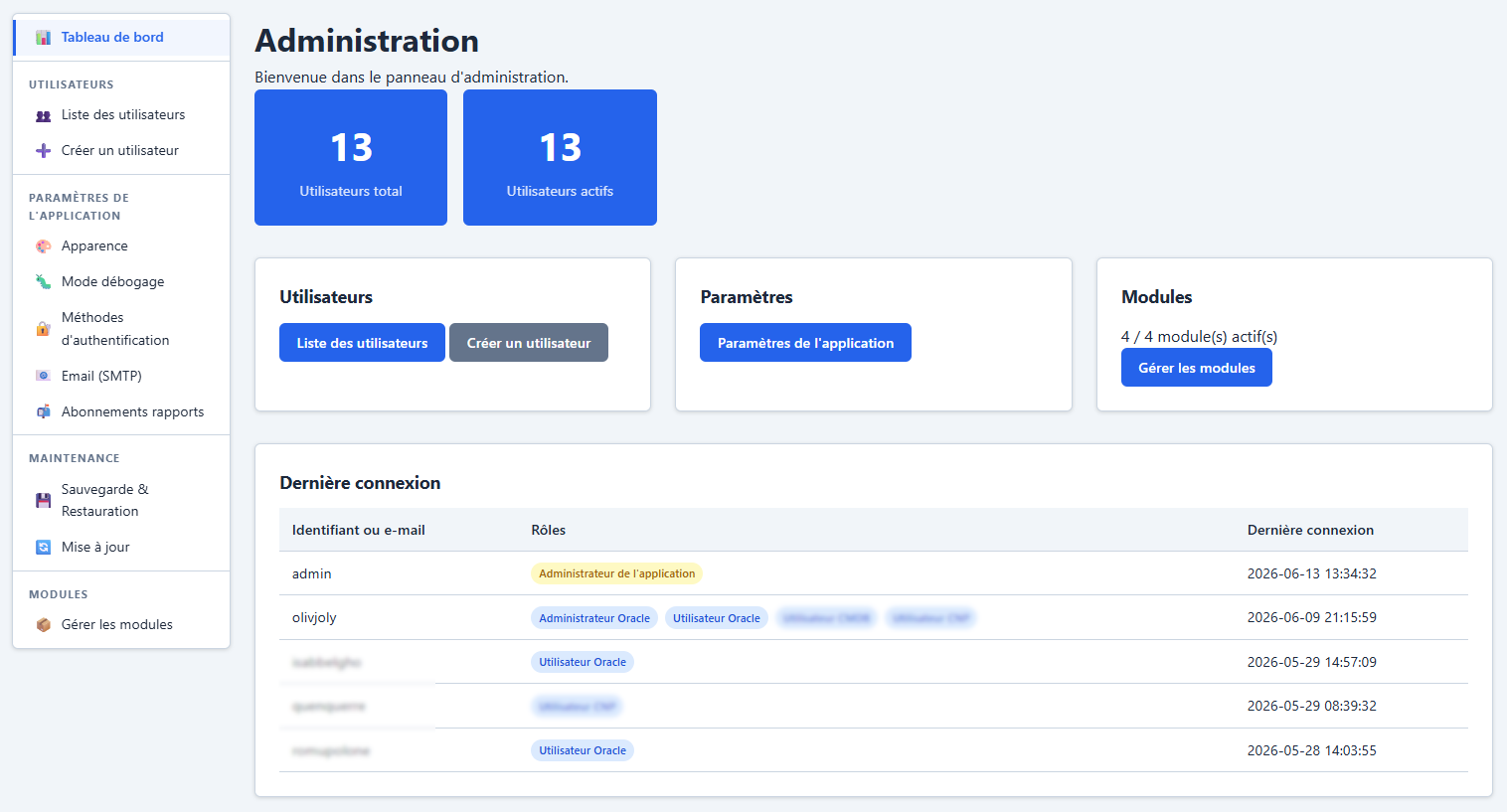
The administration panel is organised into sections in the left-hand sidebar:
graph TD
 A[Administration] --> B[Dashboard]
 A --> C[Users]
 A --> D[Settings]
 A --> E[Maintenance]
 A --> F[Modules]
 C --> C1[User list]
 C --> C2[Create a user]
 D --> D1[Appearance]
 D --> D2[Debug / Trace]
 D --> D3[Authentication methods]
 D --> D4[SMTP]
 E --> E1[Backup and restore]
 E --> E2[Update]
 F --> F1[Module management]
2. User management
Access: app_admin only.
User list
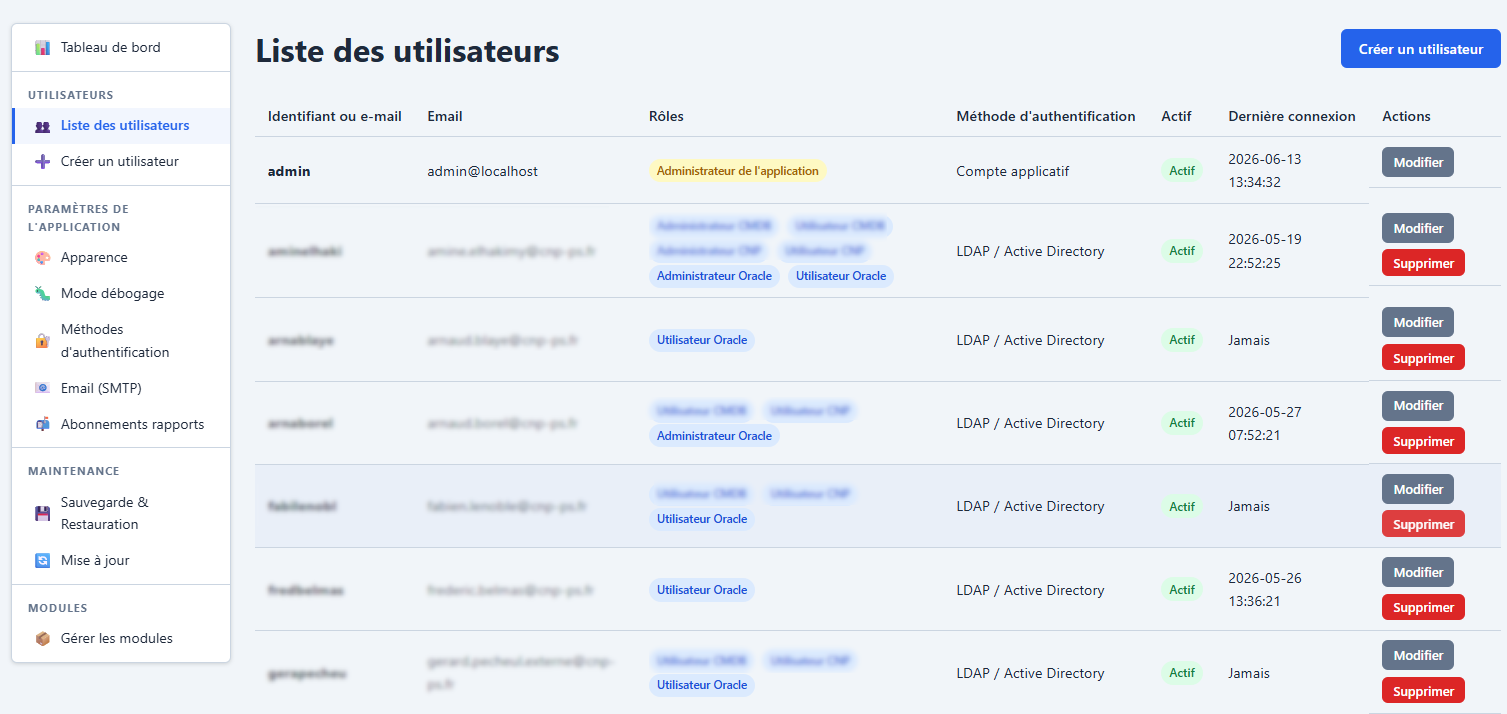
A table of all accounts with:
- Username, e-mail
- Authentication method (local / LDAP / OAuth)
- Assigned roles
- Status (active / inactive)
- Last login
- Actions: edit, delete
Creating a user
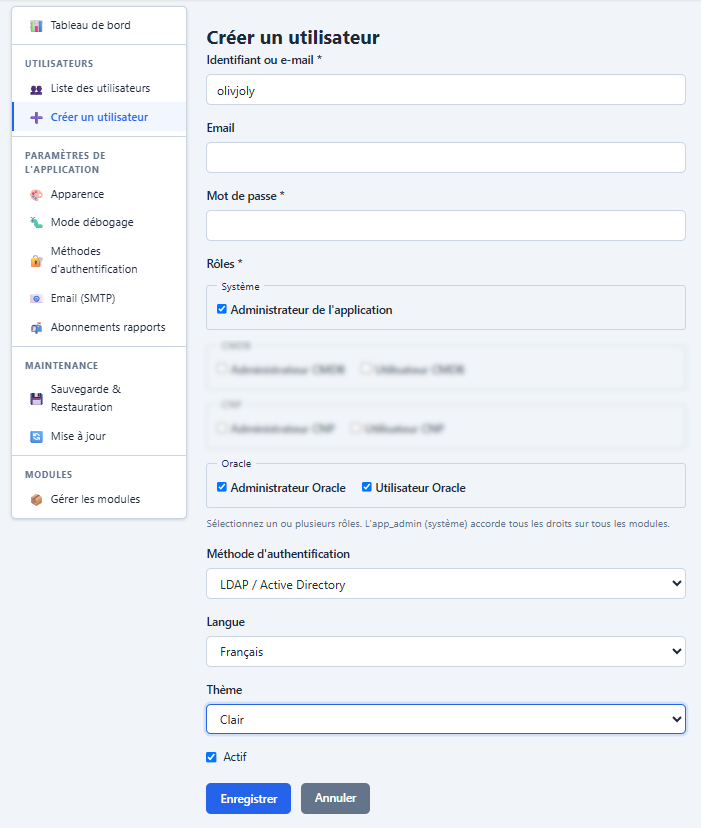
| Field | Required | Notes |
|---|---|---|
| Username | Yes | Unique, cannot be changed after creation |
| No | ||
| Password | Yes (on creation) | Min. 8 characters, hashed with bcrypt |
| Auth method | Yes | local, ldap or oauth |
| Roles | No | Checkboxes grouped by module |
| Language | No | Inherits the default if empty |
| Theme | No | Inherits the default if empty |
| Active | Yes | An inactive account cannot log in |
Editing a user
Same form as creation, with the following rules:
- The username is read-only
- The password is optional (empty = keep the existing one)
- Protection: you cannot remove your own
app_adminrole nor delete your own account
Accounts created automatically (LDAP/OAuth)
On a first LDAP or OAuth login, an account is created automatically with no role. The administrator must assign the roles manually.
3. Role system
Multi-role architecture
Each user can have 0 to N roles. Roles are of two kinds:
graph LR
 subgraph "System roles"
 A[app_admin<br>Super-administrator]
 end
 subgraph "Module roles"
 B[oracle_admin]
 C[oracle_user]
 D[module_admin]
 E[module_user]
 end
 A -.->|"implicit access<br>to everything"| B
 A -.-> C
 A -.-> D
 A -.-> E
app_admin is an implicit super-role: every role check (hasRole, hasAnyRole, canAccess, canAccessAsAdmin) returns true if the user holds it.
Roles declared by modules
Each module declares its own roles in its descriptor. Convention:
<module>_admin: full access to the module (configuration + consultation)<module>_user: consultation only
Roles are automatically synchronised into the roles table when the application starts (idempotent).
Checking roles in code
| Method | Usage |
|---|---|
$auth->hasRole('oracle_admin') | Checks a specific role |
$auth->hasAnyRole('oracle_admin', 'oracle_user') | Checks for at least one role |
$auth->requireRole('oracle_admin') | Blocks with HTTP 403 if the role is missing |
4. Authentication methods
Overview
Methods are configured under Settings > Authentication methods.
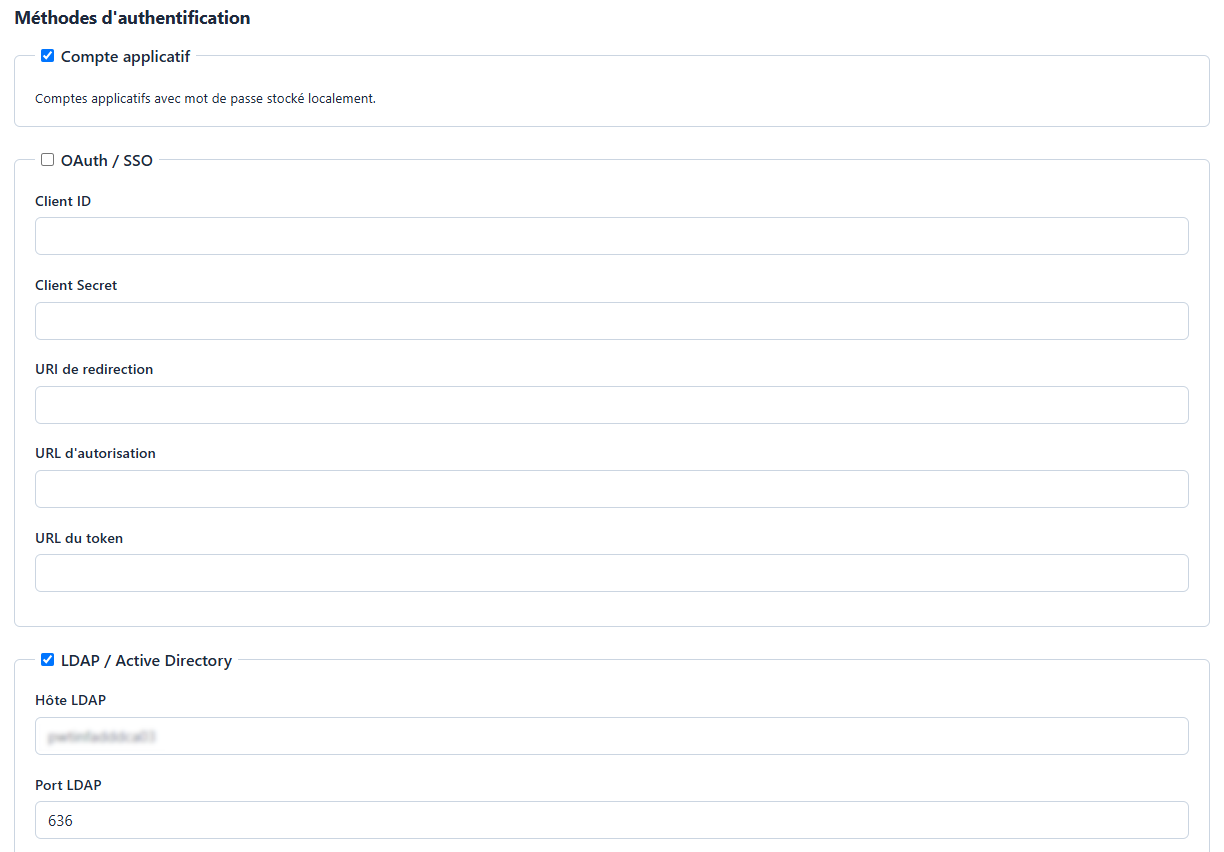
Each method can be enabled/disabled independently. Several methods can coexist.
Local authentication
No configuration required. Accounts and passwords are stored in the application’s SQLite database. Passwords are hashed with bcrypt.
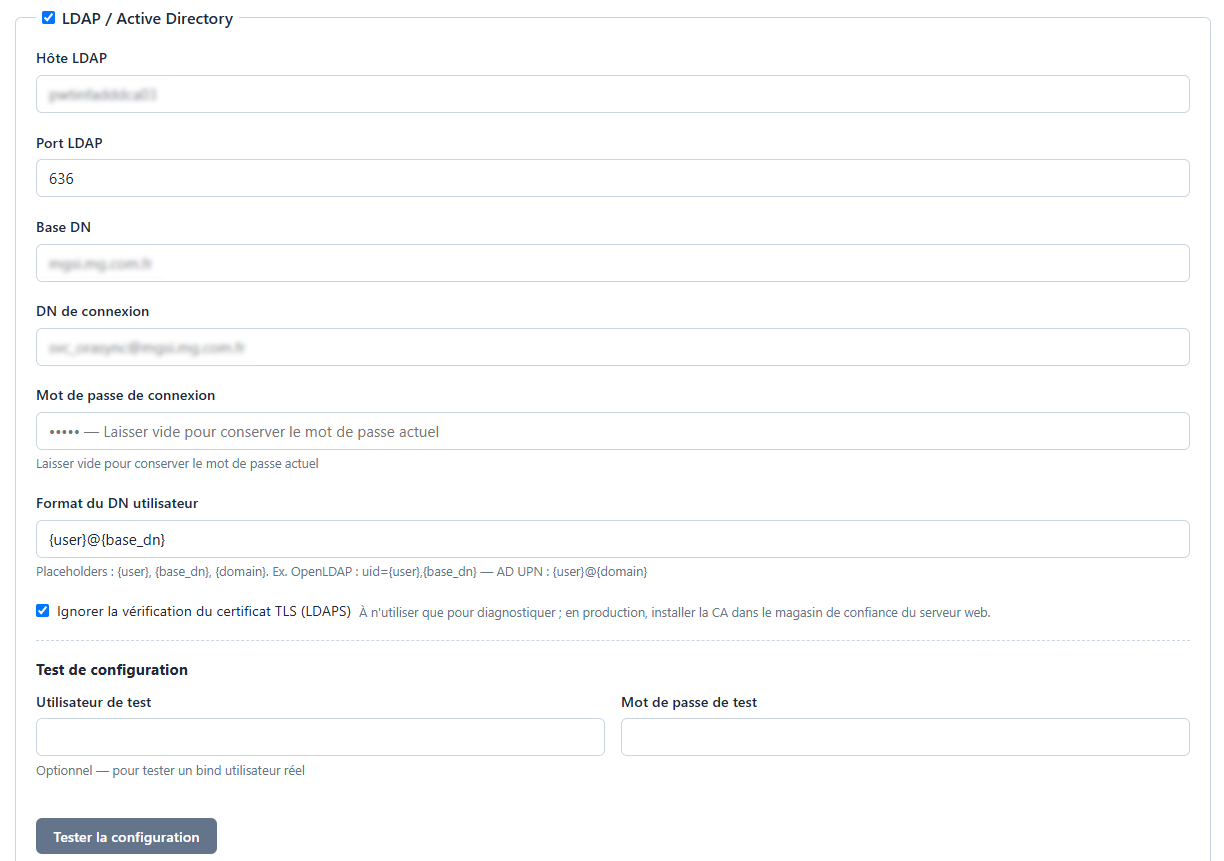
LDAP authentication
| Parameter | Description |
|---|---|
| Host | LDAP server address (e.g. ldap.example.com) |
| Port | Port (389 for LDAP, 636 for LDAPS) |
| Base DN | Search root (e.g. dc=example,dc=com) |
| Bind DN | Service account DN (e.g. cn=admin,dc=...) |
| Bind Password | Service account password (encrypted at rest) |
| User DN Pattern | Search pattern (e.g. uid={user},{base_dn}) |
| TLS insecure | Accept self-signed certificates |
Variables available in the User DN Pattern:
| Variable | Replaced by |
|---|---|
{user} | The username entered |
{base_dn} | The value of the Base DN field |
{domain} | The domain extracted from the DC= of the Base DN |
A Test connection button validates the configuration.
OAuth / OIDC authentication
| Parameter | Description |
|---|---|
| Client ID | The application’s identifier with the provider |
| Client Secret | Client secret (encrypted at rest) |
| Redirect URI | Callback URL (e.g. https://app.example.com/login.php) |
| Auth URL | The provider’s authorization URL |
| Token URL | Token exchange URL |
Compatible with any OpenID Connect provider (Keycloak, Azure AD, Google, etc.).
5. Application settings
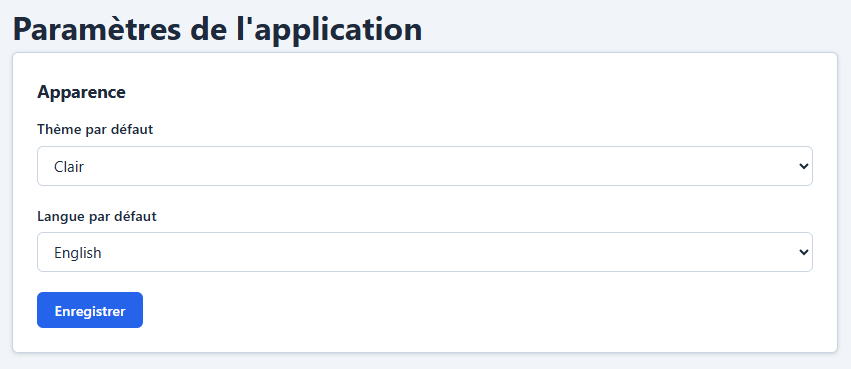
Appearance
| Parameter | Description |
|---|---|
| Default theme | Theme applied to new users and to visitors |
| Default language | Language applied when the user has no preference |
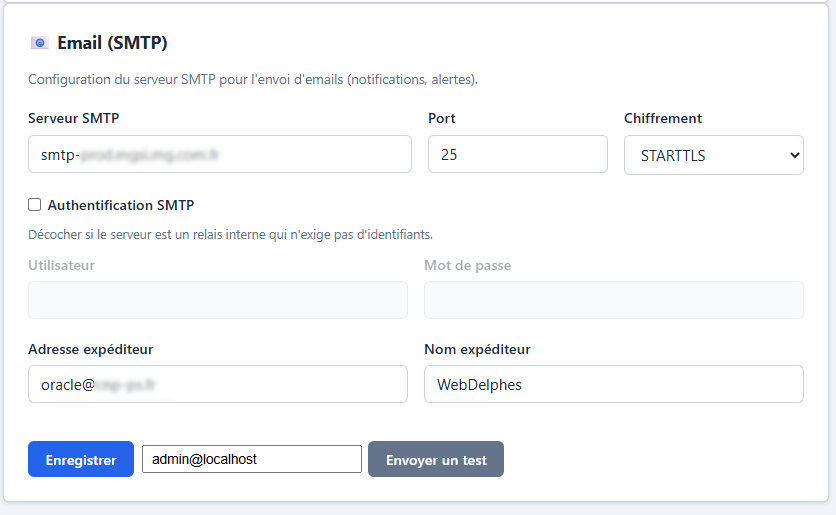
SMTP (sending e-mails)
| Parameter | Description |
|---|---|
| SMTP server | Host name |
| Port | 25, 465 (SSL) or 587 (STARTTLS) |
| Encryption | None, TLS (STARTTLS) or SSL. Self-signed certificates are accepted (internal relays). |
| SMTP authentication | Checkbox. Uncheck for an anonymous internal relay (no credentials required). |
| Username | Active only if the checkbox is ticked |
| Password | Encrypted at rest. Active only if the checkbox is ticked |
| Sender address | The From: address |
| Sender name | Display name |
The Send a test button sends a real HTML e-mail (with the application logo) to the address entered. The full SMTP conversation log (commands and responses) is shown to make diagnosis easier.
6. Module system
Principle
Each module is a folder under mon-appli/modules/<name>/ containing a module.php descriptor. Discovery is automatic at startup.
sequenceDiagram
 participant B as Bootstrap
 participant M as Module Registry
 participant DB as SQLite database
 B->>M: glob(modules/*/module.php)
 loop Each module
 M->>DB: INSERT OR IGNORE module
 M->>DB: INSERT OR IGNORE module roles
 end
 Note over M: Modules discovered but not necessarily active
Enable / Disable
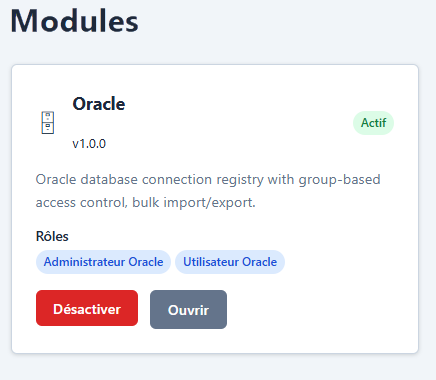
On the Module management page, each module is shown as a card with:
- Name, version, description, icon
- Green badge (active) or red badge (inactive)
- Declared roles
- Dependencies
- Enable/Disable button
Dependency rules:
- A module can only be enabled if all the modules it depends on (
depends_on) are already active - A module can only be disabled if no active module depends on it
Activation hook: some modules run a verification script before activation (e.g. checking that a prerequisite configuration is in place). On failure, activation is refused with an error message and a redirect to the module’s configuration page.
Grouped activation (PostgreSQL): if the postgresql module is inactive, an “Enable PostgreSQL and its dependencies” button appears in the page header. It enables the postgresql module together with all the modules it depends on (depends_on, followed transitively), in the order imposed by the dependencies. Each module’s activation hooks and provisioning run normally; if a module fails, the other activations continue and a message summarises the enabled modules and the failures (with their reason). Unlike single activation, there is no redirect to the configuration page of the failed module.
Adding and updating a module
At the bottom of the Module management page, the “Add or update a module” form accepts a ZIP archive containing a single module folder, with its module.php at the root of that folder (the format produced by *Developer -> Export a module*). The folder name and the descriptor’s name key must match, otherwise the archive is refused.
Processing depends on whether the module exists:
| Case | Behaviour |
|---|---|
| Module absent | Added disabled. Enable it afterwards. |
| Module already installed | Updated in place, without disabling it first. |
On an update, only the module’s files are replaced. Kept unchanged: its active/inactive state, its roles and their assignments to users, its configuration and its data tables. This is the key difference with deletion, which erases roles, assignments and configuration.
Update flow:
- the application enters maintenance mode (
app_adminusers keep access); - the installed version is backed up to
securite/backups/module_<name>_<timestamp>.zip— the 3 most recent backups are kept; - the files are replaced; on failure, the previous version is restored automatically;
- if the module is active and declares an activation hook, it is replayed (the hook point for a new version’s schema migrations); its failure is reported without disabling the module;
- maintenance mode is lifted.
The backup produced is itself a valid module archive: to roll back to the previous version, simply re-upload it through this same form.
If the replacement fails and the restore also fails, maintenance mode is deliberately left active: restore the backup named in the error message, then lift maintenance from *Administration -> Update*.
Deleting a module
Reserved for disabled modules. It removes the module folder then cleans the database: the modules row, the module’s roles (and therefore their user assignments, cascading) and the configuration file. The module’s data tables are not deleted. To ship a new version of a module, use the update, not the delete + reinstall pair.
Module configuration
Each module can store its configuration in a JSON file securite/modules/<name>.json (formerly the modules.config field, migrated automatically at startup). Access is through:
$moduleRegistry->getConfig('oracle') // read
$moduleRegistry->updateConfig('oracle', [...]) // write
7. Backup and restore
Access: app_admin only.
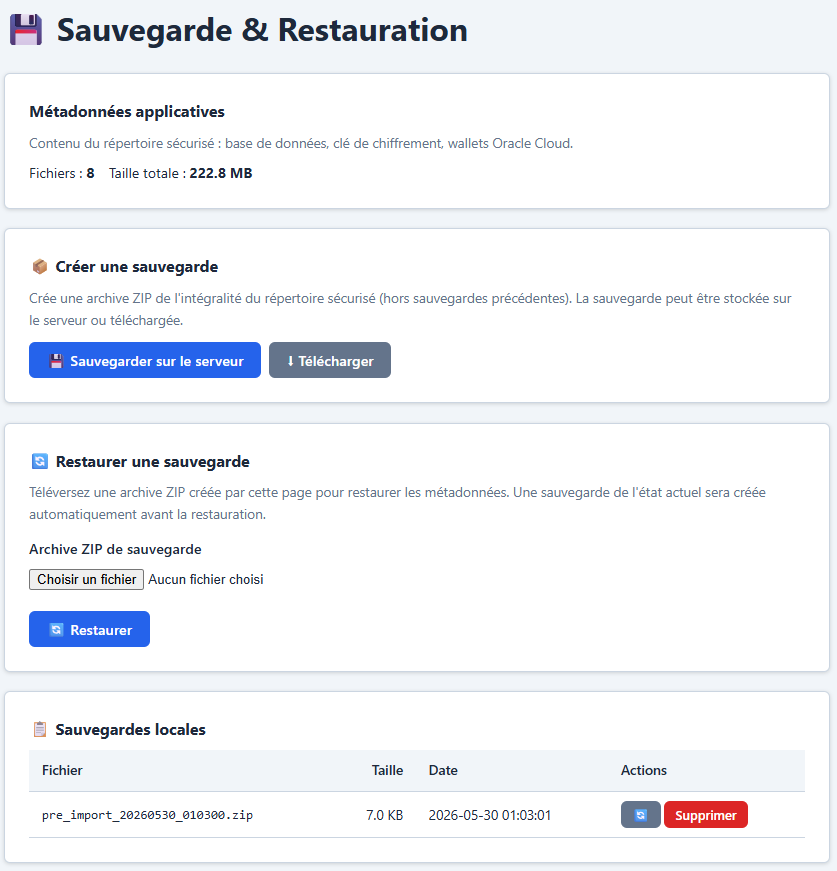
Scope
The backup covers the whole securite/ directory:
| Content | File |
|---|---|
| Application database | database.sqlite |
| Encryption key | master.key |
| Oracle wallets | wallets/ |
| CPU schedule snapshots | cpu_schedule_snapshots/ |
| Other secret files | Every file under securite/ |
Important: themaster.keykey and thedatabase.sqlitedatabase must be backed up together. Losing the key makes the encrypted passwords unrecoverable.
Create a backup
Two options:
| Action | Result |
|---|---|
| Back up locally | Creates metadata_YYYYMMDD_HHMMSS.zip in securite/backups/ |
| Download | Generates the ZIP and offers it for download |
Restore a backup
- From a file: upload a ZIP file through the form
- From a local backup: select it in the list
The restore:
- Automatically creates a pre-restore backup (
pre_restore_YYYYMMDD_HHMMSS.zip) before overwriting the files - Extracts file by file with a success/failure report
- Restores the permissions of
master.key(mode 0600)
Warning: the restore replaces the database. After a restore, accounts, roles and configuration revert to the state of the backup.
Managing local backups
The table lists the ZIPs in securite/backups/ with:
- File name, size, date
- Buttons: Restore, Delete
8. Logging and debug
Log files
| File | Content | Active by default |
|---|---|---|
log/app.log | Application events (logins, errors) | Yes |
log/debug.log | Detailed debug messages | No |
log/trace.log | Full trace of every HTTP request | No |
Enabling
Under Settings > Debug / Trace:
| Parameter | Description |
|---|---|
| Debug mode | Enables debug.log — detailed messages |
| Trace mode | Enables trace.log — every HTTP request with URL, parameters, headers |
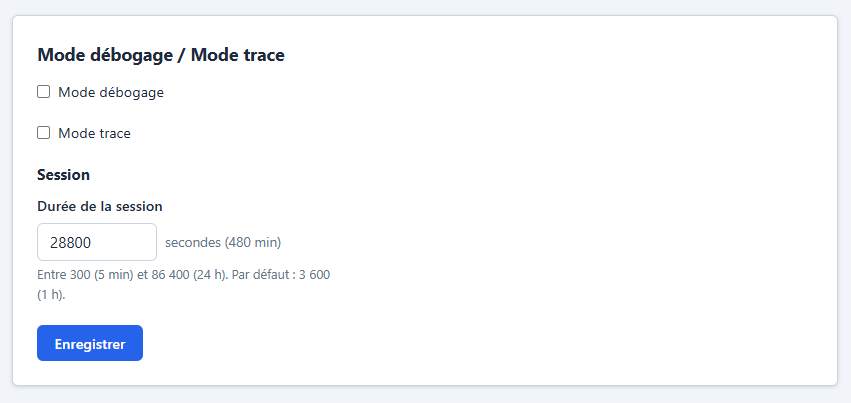
Performance: trace mode generates a large volume of logs. Only enable it temporarily to diagnose a problem.
9. Security
Encryption at rest
Secrets (LDAP, OAuth, Oracle passwords, CMDB wallet) are encrypted with libsodium (XSalsa20-Poly1305 AEAD).
graph LR
 A[Plaintext<br>password] -->|Crypto::encrypt| B["enc_v1:base64(nonce||ciphertext)"]
 B -->|Crypto::decrypt| C[Plaintext<br>password]
 D[securite/master.key<br>32 bytes] --> A
 D --> B
- Master key:
securite/master.key(32 bytes, auto-generated, mode 0600) - Format:
enc_v1:prefix followed by the nonce and ciphertext in base64 - Idempotence:
Crypto::encrypt()does not re-encrypt an already encrypted value; an empty string stays empty
CSRF protection
Every POST form includes a CSRF token (csrf_token) checked server-side via hash_equals().
Session protection
| Measure | Detail |
|---|---|
| HttpOnly cookie | JavaScript cannot read the session cookie |
| SameSite=Lax cookie | Protection against cross-site CSRF attacks |
| Secure cookie | Sent over HTTPS only (where applicable) |
| Regeneration | The session ID is regenerated every 5 minutes |
| Lifetime | 1 hour (configurable via SESSION_LIFETIME) |
Prepared statements
Every SQL query goes through bound parameters. No concatenation of user data into queries.
Appendices
Tree of important files
securite/
 database.sqlite Application database (SQLite)
 master.key Encryption key (mode 0600)
 backups/ ZIP backups
 wallets/<id>/ Oracle Cloud wallets
 cpu_schedule_snapshots/ CPU schedule snapshots
 remediation_oracle.json Scheduled remediation tasks
 cmdb.sqlite Local CMDB cache

log/
 app.log Application log
 debug.log Debug (if enabled)
 trace.log HTTP trace (if enabled)

mon-appli/
 bootstrap.php Common entry point
 login.php Authentication
 index.php Dashboard
 admin/ Administration pages
 modules/oracle/ Oracle module
 i18n/ Translation files
 assets/ CSS, JS, images
 includes/ Header, footer, navigation
Database schema (main tables)
erDiagram
 users ||--o{ user_roles : "has"
 roles ||--o{ user_roles : "assigned to"
 users {
 int id PK
 text username UK
 text email
 text password_hash
 text auth_method
 text language
 text theme
 int active
 datetime last_login
 }
 roles {
 int id PK
 text name UK
 text label
 text module
 int is_system
 }
 user_roles {
 int user_id FK
 int role_id FK
 datetime granted_at
 }
 auth_config {
 text method PK
 int enabled
 text config
 }
 settings {
 text key PK
 text value
 }
 modules {
 text name PK
 text label
 int active
 text config
 }