
This document covers the administration of the Oracle module.
0. Prerequisites and module configuration
Prerequisites
- PHP extension
oci8+ Oracle Instant Client on the web server. Without it, the module is shown but no connection is possible. ZipArchiveextension if you use Oracle Cloud connections (wallet import).- The
oracle_adminrole to administer (theapp_adminsuper-role also works).
Module configuration
The Oracle module has no global configuration page and no activation hook: there is nothing to set before enabling it, and no securite/modules/oracle.json file is created. Activation simply creates the oracle_admin and oracle_user roles.
All configuration is application-level and is done in the module’s pages, in this order:
- Groups (§2) — organise the databases; the
Defaultgroup exists out of the box. - Databases (§1) — declare the connections (standard or Cloud/wallet).
- Access (§3) — grant rights per group × subgroup.
- Internal Oracle roles (§4) — optional, to share rights.
Subgroups are fixed by the application: dev, homol, perf, pre-prod, prod, secours.
Data and backup
Connections live in the application database (oracle_* tables), passwords there are encrypted, and Cloud wallets are extracted under securite/wallets/<database_id>/.
Back up securite/master.key together with the application database: without this key, the stored passwords are unrecoverable.
1. Registering databases
Access: oracle_admin only.
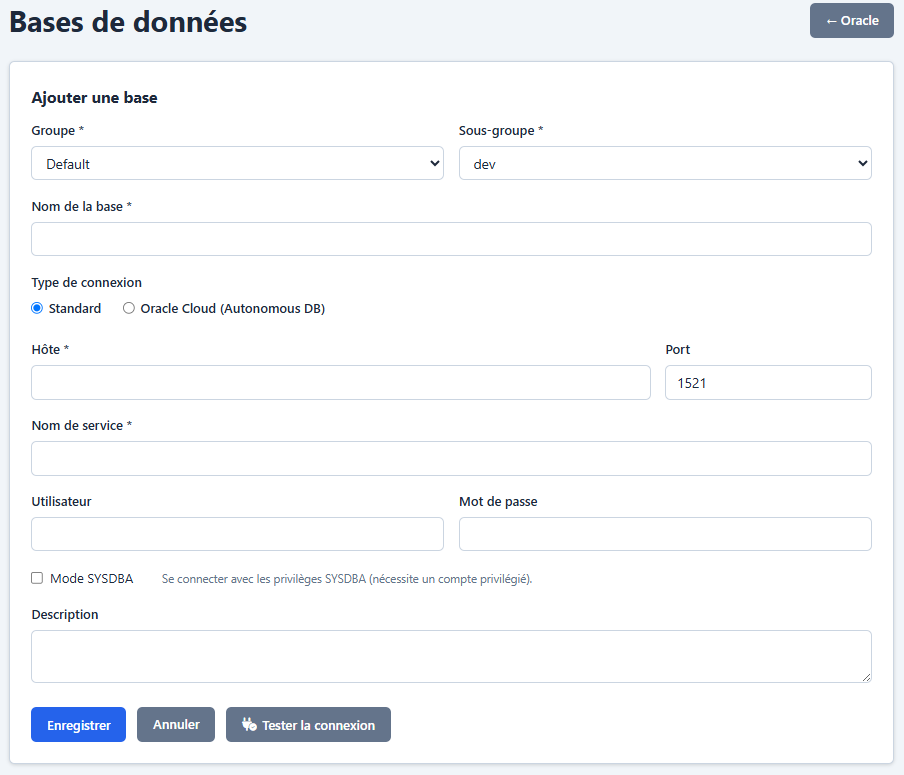
Connection types
graph TD
 A[New database] --> B{Type?}
 B -->|Standard| C["host:port/service_name"]
 B -->|Cloud / Wallet| D["TNS Alias + wallet ZIP file"]
 C --> E[Connection test]
 D --> F[Wallet extraction<br>into securite/wallets/]
 F --> E
 E -->|OK| G[Saved]
Standard connection
| Field | Description |
|---|---|
| Host | Server IP address or DNS name |
| Port | Listener port (default 1521) |
| Service Name | Oracle service name |
Cloud connection (wallet)
| Field | Description |
|---|---|
| TNS Alias | Alias defined in the wallet’s tnsnames.ora |
| Wallet | ZIP file containing the Oracle Cloud wallet |
The wallet is extracted into securite/wallets/<database_id>/. The sqlnet.ora file is automatically edited to point to the right directory. Cloud databases automatically have the Diagnostic and Tuning Pack licences.
Common fields
| Field | Required | Description |
|---|---|---|
| Name | Yes | The database’s identifier in the application |
| Group | Yes | Organisational group |
| Subgroup | Yes | Environment (dev, homol, perf, pre-prod, prod, secours) |
| Username | No | Oracle connection account |
| Password | No | Encrypted at rest |
| SYSDBA | No | Connect AS SYSDBA |
| Description | No | Free notes |
Connection test
The Test button performs a real OCI8 connection and shows the Oracle version on success.
Session initialisation
On every connection, the application automatically sets:
- NLS formats (ISO-8601 dates, binary sort)
- Client identifier (
dbms_session.set_identifier) - Module/Action (
dbms_application_info.set_module) — visible inV$SESSIONfor auditing
2. Database groups
Access: oracle_admin only.
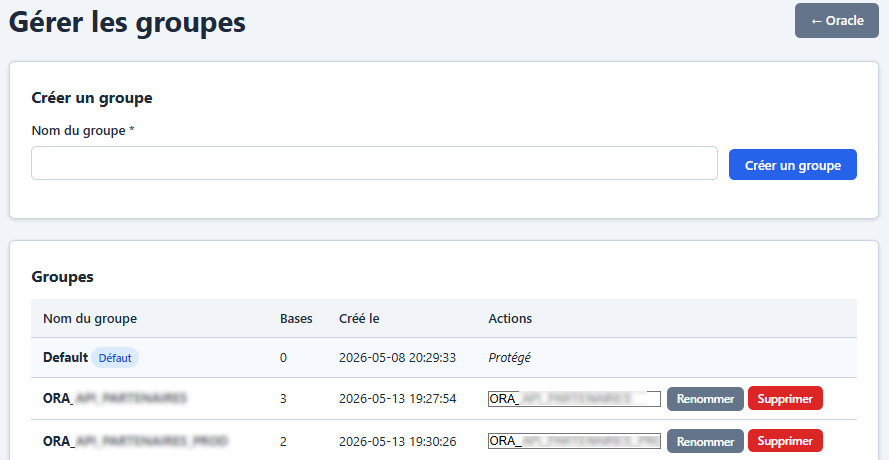
Databases are organised into groups (e.g. “Production”, “Dev/Test”, “Cloud”). Each group holds databases split into subgroups (environments).
| Action | Description |
|---|---|
| Create a group | Unique name |
| Rename | Change the name |
| Delete | Not possible if the group contains databases. The “Default” group cannot be deleted |
Groups are the basis for access control (see next section).
3. Oracle access control
Access: oracle_admin only.
Access model
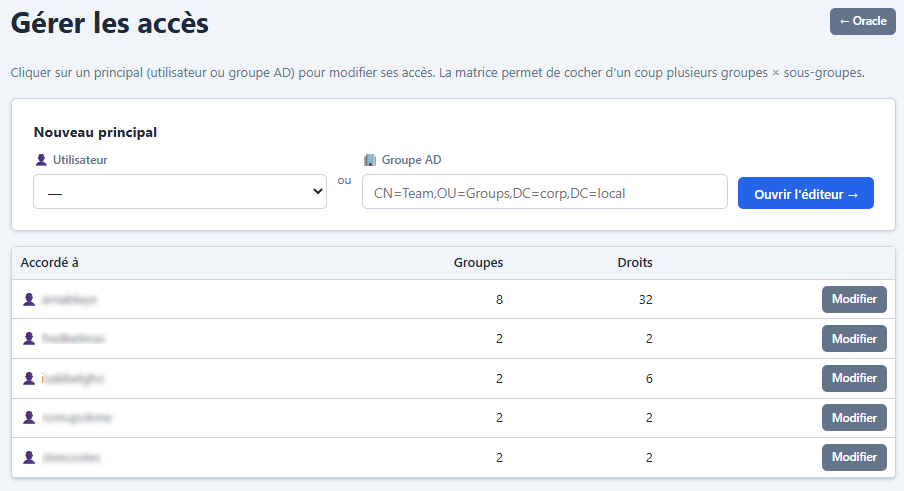
Access to databases is controlled by a principal × group × subgroup × right matrix:
graph TD
 A[User] --> B{Access?}
 B -->|oracle_admin| C[All databases]
 B -->|app_admin| C
 B -->|Direct access| D[Databases of the granted group/subgroup]
 B -->|Via Oracle role| E[Databases of the role's group/subgroup]
 D --> F{Right?}
 E --> F
 F -->|consultation| G[Read only]
 F -->|dba_dev| H[Read + kill session + SQL fix]
 F -->|dba| I[All DBA actions]
Principals
Two kinds of principal:
| Type | Encoding | Description |
|---|---|---|
| User | u:<user_id> | Application user |
| AD group | a:<encoded_DN> | Active Directory group (for LDAP accounts) |
Rights
Hierarchy: dba > dba_dev > consultation.
| Right | Grants |
|---|---|
consultation | View the database reports |
dba_dev | Consultation + kill session + SQL fix (profiles, patches, baselines) |
dba | Everything: consultation + kill + SQL fix + stats, tablespaces, redo logs, scheduler, bash_snapper |
The oracle_right_at_least($right, $minLevel) helper centralises level comparisons.
Editing interface
- List view: a table of principals with the number of accessible groups/subgroups
- Edit view (click a principal): a groups × subgroups matrix with a selector (—, consultation, dev, dba)
Changes are transactional: the old rights are removed and the new ones inserted.
Special case:group_id = NULLmeans “all groups (present and future)”.subgroup = NULLmeans “all subgroups”.
4. Internal Oracle roles
Access: oracle_admin only.
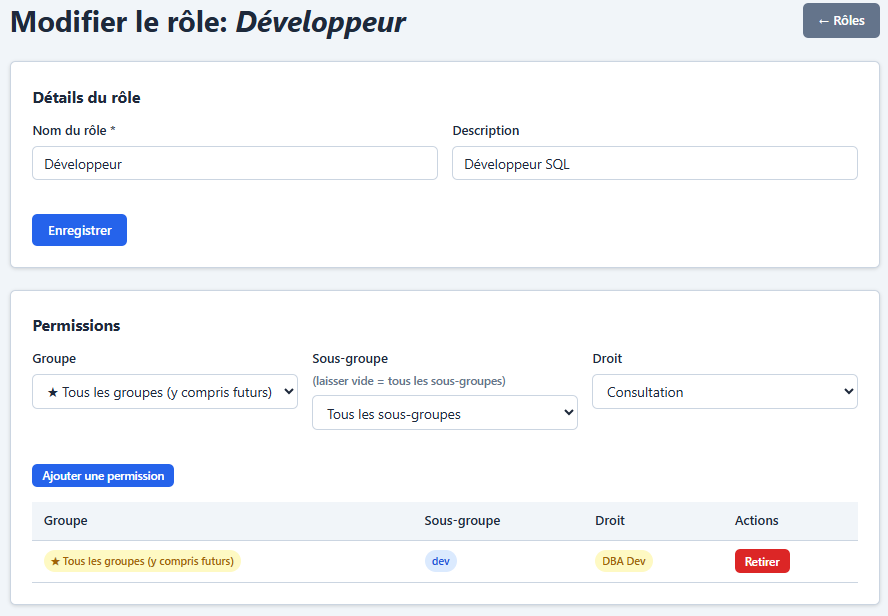
Note: these roles are internal to the Oracle module and distinct from the application roles (oracle_admin,oracle_user). They are an additional mechanism for grouping access permissions.
Structure
| Table | Description |
|---|---|
oracle_roles | Role catalogue (name, description) |
oracle_role_perms | Role permissions (group_id, subgroup, right) |
oracle_role_grants | Role assignment to principals |
Operations
| Action | Description |
|---|---|
| Create a role | Name + description |
| Edit permissions | Add/remove group + subgroup + right combinations |
| Grant | Give the role to users or AD groups |
| Delete | Deletes the role and its grants |
Right resolution is recursive (a role can include other roles, with protection against cycles).
5. Database import/export
Access: oracle_admin only.
Export
Generates a JSON file containing all registered databases with:
- Connection parameters
- Passwords (encrypted)
- Group and subgroup
- Description
Import
Upload a JSON file: the databases are merged into the existing registry. Passwords are re-encrypted if needed. The associated wallets are re-extracted.
6. Oracle licences
The module automatically detects the Diagnostic Pack and Tuning Pack licences of each database.
Detection
| Database type | Method |
|---|---|
| Standard | Reads V$PARAMETER.control_management_pack_access |
| Cloud (wallet) | Diagnostic + Tuning always considered available |
Impact on features
| Feature | Required licence |
|---|---|
| ASH history (DBA_HIST_*) | Diagnostic Pack |
| AWR report | Diagnostic Pack |
| Oracle ASH report | Diagnostic Pack |
| SQL Monitor | Tuning Pack |
| Heatmaps | Diagnostic Pack |
| sw$bash_snapper (alternative) | None |
When a licence is missing, the affected reports display a warning banner with the value of the CONTROL_MANAGEMENT_PACK_ACCESS parameter.
7. sw$bash_snapper administration
Context
sw$bash_snapper is a PL/SQL package that samples Oracle session activity in an AWR-like fashion, without requiring a Diagnostic Pack licence. It is a free alternative for databases without that licence.
Prerequisites
- DBA right on the target database
- An Oracle account with the CREATE TABLE, CREATE PROCEDURE, MANAGE SCHEDULER privileges
Life cycle
stateDiagram-v2
 [*] --> Not_installed
 Not_installed --> Installed : Install
 Installed --> Running : Start
 Running --> Installed : Stop
 Installed --> Not_installed : Uninstall
 Running --> Running : Purge
Objects created
| Oracle table | AWR equivalent | V$ source |
|---|---|---|
SW$BASH_ACTIVE_SESSION_HISTORY | GV$ACTIVE_SESSION_HISTORY | GV$SESSION (1s) |
SW$BASH_HIST_ACTIVE_SESS_HISTORY | DBA_HIST_ACTIVE_SESS_HISTORY | Persistence |
SW$BASH_SNAPSHOT | DBA_HIST_SNAPSHOT | Hourly snapshots |
SW$BASH_HIST_SYSSTAT | DBA_HIST_SYSSTAT | V$SYSSTAT |
SW$BASH_HIST_SYSTEM_EVENT | DBA_HIST_SYSTEM_EVENT | V$SYSTEM_EVENT |
SW$BASH_HIST_SEG_STAT | DBA_HIST_SEG_STAT | V$SEGMENT_STATISTICS |
SW$BASH_HIST_SQLSTAT | DBA_HIST_SQLSTAT | V$SQL top 50 |
SW$BASH_HIST_DATABASE_INSTANCE | DBA_HIST_DATABASE_INSTANCE | V$INSTANCE + V$DATABASE |
SW$BASH_SETTINGS | — | Key/value configuration |
SW$BASH_LOG | — | Collector log |
Administration interface
From the Diagnostics > sw$bash_snapper report:
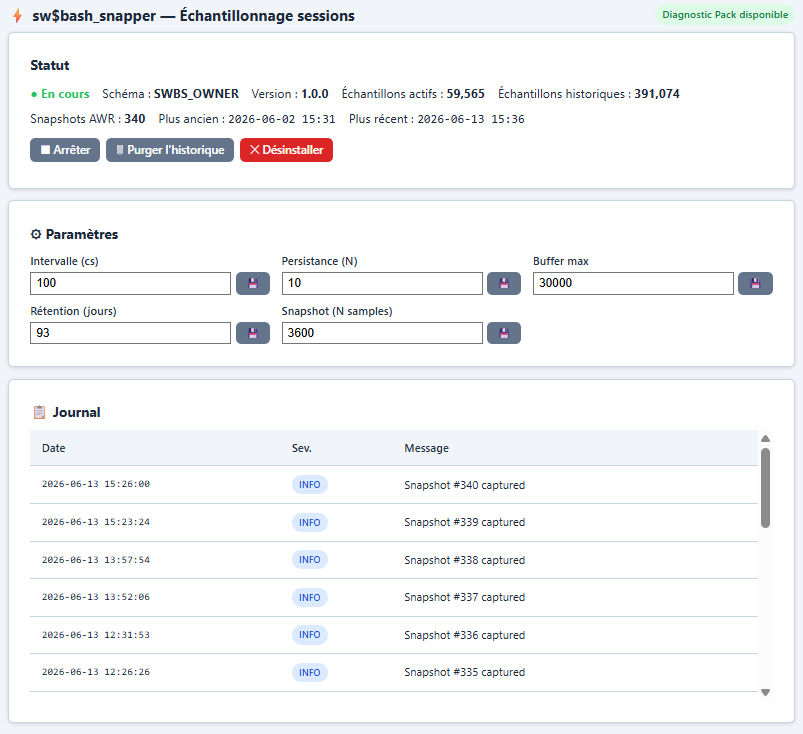
Information shown:
- Collector status (running / stopped)
- Package version
- Number of active and historical samples
- Number of snapshots
- Date range of the available data
Actions:
| Button | Action |
|---|---|
| Install | Creates all objects (tables, indexes, package, settings) |
| Start | Launches one DBMS_SCHEDULER job per active instance (RAC) |
| Stop | Graceful stop via a flag |
| Purge | Removes history older than N days (form) |
| Uninstall | Removes all objects and jobs |
Editable parameters:
| Parameter | Default | Description |
|---|---|---|
sample_every_n_centiseconds | 100 (1s) | Sampling frequency |
persist_every_n_samples | 10 | Number of samples before flushing to history |
max_entries_kept | 30,000 | Size of the in-memory ring buffer |
hist_days_to_keep | 93 | History retention in days |
snapshot_every_n_samples | 3,600 (1h) | Frequency of the mini AWR snapshots |
Log: the last 20 entries of the collector log (SW$BASH_LOG) are shown at the bottom of the page with severity and message.
Automatic fallback
When sw$bash_snapper is installed and the database has no Diagnostic Pack licence, the historical reports (ASH, heatmaps) automatically switch to the SW$BASH_* tables instead of DBA_HIST_*. This switch is transparent to the user.
8. DBA operations
The following operations require the DBA right on the selected database, unless stated otherwise (some are available from dba_dev).
Kill Session (dba_dev+)
Available from the Real time > Active sessions and Real time > Locks reports.
- Runs
ALTER SYSTEM KILL SESSION 'sid,serial#,@inst_id' - Confirmation requested before execution
- CSRF protected
Statistics gathering (dba)
Available from the Statistics gathering dashboard:
- A “Gather” button next to each table with stale statistics
- Runs
DBMS_STATS.GATHER_TABLE_STATSvia DBMS_SCHEDULER (asynchronous execution)
Scheduling system/dictionary stats
The Schedule button opens a modal to launch an asynchronous gather via DBMS_SCHEDULER.CREATE_JOB (auto_drop=TRUE):
| Target | Oracle procedure |
|---|---|
| System stats | DBMS_STATS.GATHER_SYSTEM_STATS |
| Dictionary stats | DBMS_STATS.GATHER_DICTIONARY_STATS |
Options:
- Mode (system stats only):
NOWORKLOAD,INTERVAL,EXADATA - Flush buffer cache: runs
ALTER SYSTEM FLUSH BUFFER_CACHEbefore gathering
SQL fix (dba_dev+)
Available from the SQL detail page:
| Action | Oracle package |
|---|---|
| Create a SQL Profile | DBMS_SQLTUNE.IMPORT_SQL_PROFILE |
| Create a SQL Patch | DBMS_SQLDIAG.CREATE_SQL_PATCH (12c+) |
| Create a SQL Plan Baseline | DBMS_SPM.LOAD_PLANS_FROM_CURSOR_CACHE |
| Drop a SQL Profile | DBMS_SQLTUNE.DROP_SQL_PROFILE |
| Drop a SQL Patch | DBMS_SQLDIAG.DROP_SQL_PATCH |
Dropping SQL Profiles (SQL Tuning page)
The Config > SQL Tuning page shows the list of existing SQL Profiles. DBAs can drop a profile directly from this page via the Delete button in the Actions column.
Tablespaces & Redo Logs (dba)
Available from the Config > Tablespaces & Redo Logs report:
Resizing datafiles
The name of each data tablespace (underlined, clickable from the first render of the chart) opens a modal that loads the list of datafiles via AJAX, then lets you change the size of each one.
- Runs
ALTER DATABASE DATAFILE '<path>' RESIZE <N>M - Validation: the file path is checked against
DBA_DATA_FILESbefore execution (injection protection)
Managing redo log groups
| Action | Oracle command |
|---|---|
| Add a group | ALTER DATABASE ADD LOGFILE THREAD <n> GROUP <g> SIZE <s>M |
| Drop a group | ALTER DATABASE DROP LOGFILE GROUP <g> |
| Drop a thread | Drops every INACTIVE group of the thread |
Resizing all redo logs
The Resize all redo logs button re-creates each group with the new size. The operation proceeds by:
- Log switch (
ALTER SYSTEM SWITCH LOGFILE) + checkpoint - Drop of each INACTIVE group
- Re-creation with the new size
- ACTIVE/CURRENT groups handled last after a new switch
The result shows the number of groups re-created, skipped and in error.
DBMS_SCHEDULER management (dba)
Available from the Scheduler dashboard:
| Action | Oracle command |
|---|---|
| Enable a job | DBMS_SCHEDULER.ENABLE('<owner>.<name>') |
| Disable a job | DBMS_SCHEDULER.DISABLE('<owner>.<name>', force=>TRUE) |
| Drop a job | DBMS_SCHEDULER.DROP_JOB('<owner>.<name>', force=>TRUE) |
Dropping asks for confirmation. All actions are CSRF and DBA-right protected.
sw$bash_snapper management (dba)
Install, start, stop, purge and uninstall the collector (see section 7).
Statistics & Auto Tuning (dba)
From the Configuration → Statistics gathering and Configuration → SQL Tuning pages:
| Action | Oracle mechanism |
|---|---|
| Change a global DBMS_STATS preference | DBMS_STATS.SET_GLOBAL_PREFS |
| Schedule a system/dictionary stats gather | DBMS_STATS.GATHER_SYSTEM_STATS / GATHER_DICTIONARY_STATS (via DBMS_SCHEDULER) |
| Enable/disable “auto optimizer stats collection” | DBMS_AUTO_TASK_ADMIN.ENABLE/DISABLE |
| Change an Auto SQL Tuning Advisor parameter | DBMS_SQLTUNE.SET_AUTO_TUNING_TASK_PARAMETER |
| Enable/disable “sql tuning advisor” | DBMS_AUTO_TASK_ADMIN.ENABLE/DISABLE |
| Drop a SQL Profile | DBMS_SQLTUNE.DROP_SQL_PROFILE |
All these actions are CSRF protected and require the DBA right.
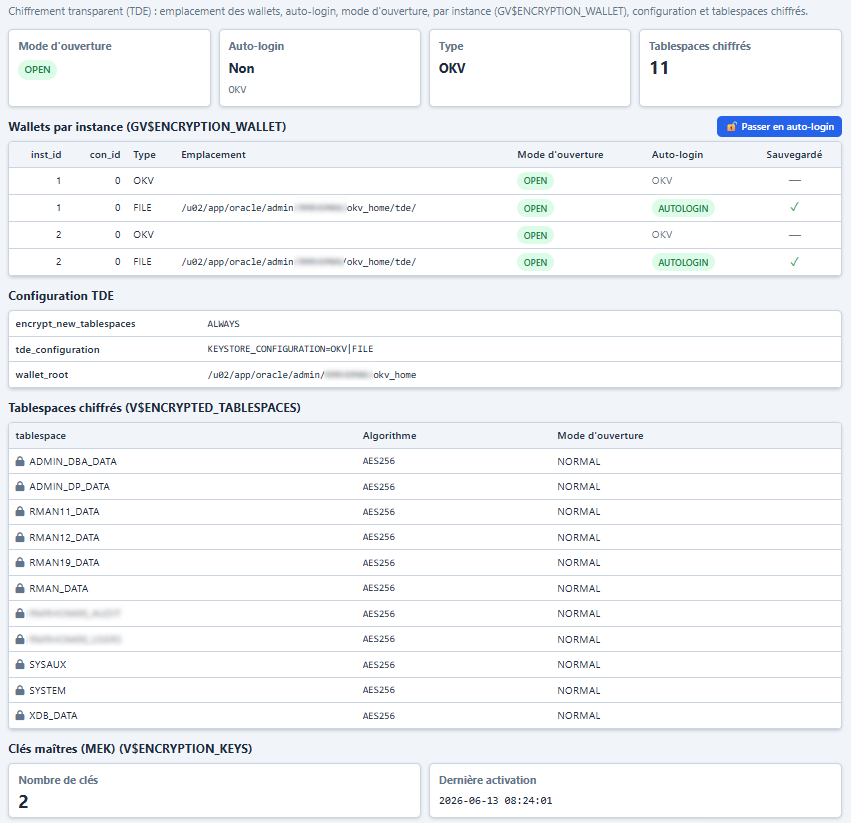
TDE — switching to auto-login (dba / app_admin)
From the TDE / Wallets dashboard, a “Switch to auto-login” button is offered to users with the DBA right on the database or the app_admin role (site administrator), and only if the wallet is not already in auto-login.
A modal window asks for the keystore password and, optionally, a local auto-login (LOCAL_AUTO_LOGIN, tied to the host — not recommended on RAC since the wallet cannot be copied to another node).
The action runs:
ADMINISTER KEY MANAGEMENT CREATE [LOCAL] AUTO_LOGIN KEYSTORE
FROM KEYSTORE '<location>' IDENTIFIED BY "<password>";- The keystore location is read on the server (
V$ENCRYPTION_WALLET), never supplied by the client. - The password is inline in the DDL: double quotes and line breaks are rejected (server-side validation). It is not logged by the application.
- The Oracle connection must have the SYSDBA / SYSKM privilege (or
ADMINISTER KEY MANAGEMENT); otherwise theORA-error is returned. - Deferred effect: the auto-login keystore (
cwallet.sso) is created but only becomes active at the next instance restart (or after closing / reopening the keystore).
Appendix: Oracle module schema
erDiagram
 oracle_databases ||--o{ oracle_access : "controlled by"
 oracle_groups ||--o{ oracle_databases : "contains"
 oracle_roles ||--o{ oracle_role_perms : "has permissions"
 oracle_roles ||--o{ oracle_role_grants : "granted via"
 oracle_databases {
 int id PK
 text name
 int group_id FK
 text subgroup
 text connection_type
 text host
 int port
 text service_name
 text tns_alias
 text username
 text password
 int sysdba
 text description
 }
 oracle_groups {
 int id PK
 text name UK
 }
 oracle_access {
 int id PK
 int user_id FK
 text ad_group
 int group_id FK
 text subgroup
 text right
 }
 oracle_roles {
 int id PK
 text name
 text description
 }
 oracle_role_perms {
 int id PK
 int role_id FK
 int group_id FK
 text subgroup
 text right
 }
 oracle_role_grants {
 int id PK
 int role_id FK
 int user_id FK
 text ad_group
 }